


Executive Summary
The professionals who stand out today use AI tools to eliminate repetitive tasks, improve output quality, and focus their energy on high-value work.
As a leading global capability center (GCC), iSupport Worldwide empowers professionals to work with international clients in dynamic, results-driven environments where AI-driven efficiency and quality are equally critical.
For professionals ready to move beyond routine work and leverage AI to build meaningful, future-ready skills, iSupport Worldwide offers the platform to do exactly that.
AI won’t suddenly give you free time. If anything, it might just make your work move faster.
You spend less time on repetitive tasks and spend more time on work that actually needs more of your energy and expertise.
And that’s the edge most professionals are already on.
Here are tasks that you should stop doing manually
If your workload feels heavy, there is a high probability that you are still doing tasks that AI tools can already handle faster, with acceptable accuracy, and with less mental fatigue on your part.
Here are the areas where AI productivity can create immediate impact if used properly:
Email Writing
Think about how much time you spend refining tone, checking grammar, and making sure your message sounds professional enough for clients or leadership.
In a global capability center (GCC) like iSupport Worldwide, where communication with US clients is constant and expectations are high, email clarity is critical.
Instead of drafting from scratch, AI tools can generate structured, context-aware emails when given the right instructions, including tone, recipient, and objective.
Meeting Work
Meetings are not the problem. The problem is everything that comes after them.
Reviewing notes, extracting key decisions, identifying action items, and summarizing them for stakeholders often takes longer than the meeting itself.
In a global capability center (GCC), where teams may likely operate across time zones, your meeting summary often becomes the single source of truth for people who were not present.
AI tools can turn transcripts or bullet notes into structured meeting summaries, organized into decisions, risks, next actions, and responsible owners, which saves cognitive effort and removes ambiguity.
Reports and Documentation
Weekly reports, executive summaries, and operational updates often follow predictable formats, yet professionals still rebuild them manually because “that’s how it’s always been done.”
AI tools can transform rough notes, chat transcripts, or bullet points into structured reports that are ready for refinement, allowing you to focus on accuracy and insight rather than formatting and phrasing.
Research
Whether you are preparing a presentation, analyzing competitors, or reviewing trends, traditional research often involves scanning multiple websites and manually synthesizing information.
In a fast-paced offshoring environment, the ability to process information quickly and deliver insights on demand is part of what sets high-performing professionals apart.
AI tools can process large volumes of information quickly and present summarized insights, comparisons, and key points, allowing you to spend less time collecting data and more time interpreting it.
Content Creation
For roles like content development, marketing, or communications, the hardest part is often not writing itself but starting.
In an offshoring setup, speed and consistency matter just as much as quality, which makes using AI tools effectively a practical advantage rather than just a technical skill.
AI tools eliminate that friction by generating outlines, draft versions, and variations that you can refine, meaning you are editing and improving instead of staring at a blank page with a deadline approaching.
How to actually improve your AI productivity
The professionals who see real gains from AI productivity are not the ones using the most tools, but the ones who use them more deliberately and more strategically.
Start small, but start where it hurts the most
According to Lakhani, as cited in Harvard Business School, tasks suitable for automation or augmentation should be assessed in terms of frequency (how often and how long they occur) and value (the benefits of finishing the task accurately compared to risks of error).
Instead of trying to automate everything at once, identify the one or two tasks that frustrate you the most or consume the most time, such as email drafting or report writing, and build your AI workflow there first.
When you see clear time savings in those tasks, it becomes easier to expand usage without feeling overwhelmed.
Write prompts like you’re giving a work brief
Most AI tools produce mediocre and generic results because the instructions given to them are incomplete.
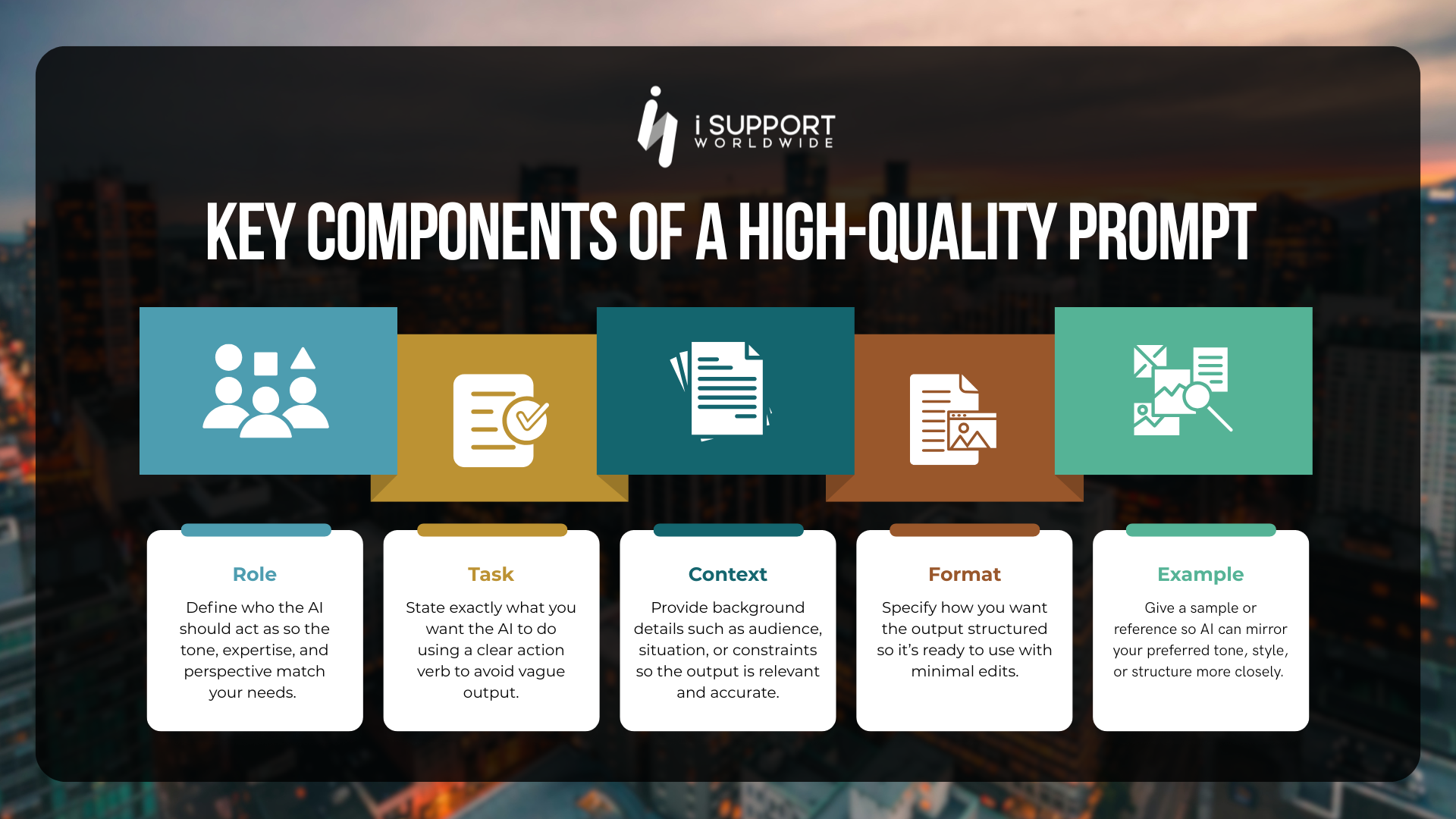
A strong prompt includes:
- The role you want AI to take
- The task you want completed
- Relevant context or background
- The format of the output
- Examples, if available
Think of it like assigning work to a junior team member. If your instructions are vague, the output will require rework.
Combine AI output with your expertise
AI tools should not replace your professional judgment, especially if you are working at a mid-to- senior level where decision-making and critical thinking are part of your value.
Instead, treat AI as a fast first draft generator, a research assistant, or a structure builder, while you remain responsible for accuracy, nuance, and final output quality.
This is where experienced professionals create real leverage, because they know what “good” looks like.
Formalize your AI workflow process
As Harvard Business Review points out, simply layering AI on top of weak processes often reveals more issues rather than solving them.
Once you’ve identified the tasks to automate and learned how to write high-quality prompts, the next step is to turn your AI usage into a consistent workflow rather than a one-off activity.
Instead of starting from scratch every time, create a simple, repeatable process you can follow whenever you use AI for work. This helps you save time, improve output quality, and reduce trial-and-error.
What you should never do with AI at work
As AI productivity increases, so does the responsibility that comes with using it properly.
Do not upload sensitive or confidential data
AI systems rely on data input, and sharing sensitive client information, internal documents, or proprietary materials can create serious data privacy risks if not handled properly.
Some AI platforms may store or process data in ways that are outside your company’s control, so understanding your organization’s policies is critical.
Do not assume AI output is always correct
AI sometimes hallucinates. It can generate content quickly, but it is not always accurate, especially when dealing with complex, technical, or nuanced information.
Submitting AI-generated work without reviewing it exposes you to errors that can affect credibility, decision-making, or client relationships.
Do not replace thinking with automation
AI tools are meant to support your work, not replace the strategic thinking that defines your role as a professional.
Over-reliance leads to generic work, missed context, and weak output that reflects poorly on your expertise.
AI skills are now an advantage
AI skills are quickly becoming one of the most important capabilities employers look for today, especially in roles that support global clients and demand both efficiency and sound professional judgment.
At iSupport Worldwide, we see this firsthand. The professionals who stand out are not just technically skilled, but know how to use AI tools intelligently, using them to simplify work, improve output, and maintain high standards without cutting corners.
If you are ready to level up your career and work with international teams in a global capability center (GCC), this is exactly the kind of skillset we value at iSupport Worldwide.
About the Author Shekina P. Malonzo is a Licensed Professional Teacher and multifaceted Content Developer at iSupport Worldwide, specializing in creating tailored materials for the offshoring industry. |
Founded in 2006, iSupport Worldwide is a US-owned offshoring leader based in the Philippines, delivering tailored solutions to enhance operational efficiency and exceed client expectations. Recognized on the Inc. 5000 list of America’s fastest-growing private companies for three consecutive years, honored in Inc. Magazine’s Power Partner Awards, and a recipient of the ACES Award for Inspiring Workplaces in Asia, iSupport Worldwide embodies a commitment to excellence. |